
Branches screen
The Branches screen holds the list of branches (warehouses, stores, sites) you work in with OpticCount, and the code your ERP uses to identify each one.
Who sees it: primary user · co-manager · sub-manager
Used by modules: counting picking goods receipt returns loans
How to get here
- On the phone: ☰ menu → Setup → Branches
- On the computer: side menu → Setup → Branches
What is on the screen
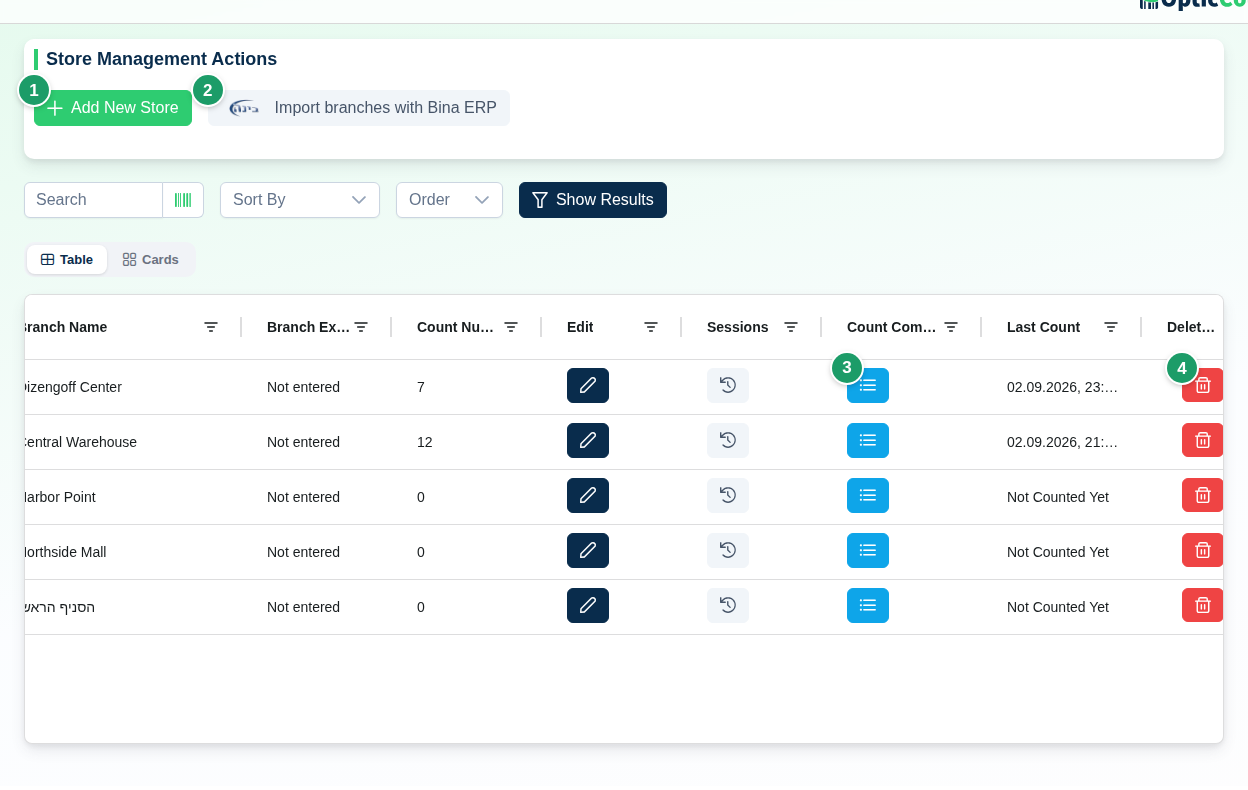
(1) Add New Store
Opens the Add New Store dialog (see "Dialog fields" below).
(2) Import Stores
Shown whenever an integration other than WhatsApp is active. With one integration the button reads Import branches with and the system name; with several, a menu opens. Branch import works with Bina and Boss; other systems return an error. The import creates missing branches and updates existing ones by their ERP code. See Integrations.
(3) Branches table
| Column | What it shows |
|---|---|
| Branch Name | The name shown in every branch picker in the app |
| Branch Export Name | The branch/warehouse code for the ERP. Empty shows Not entered |
| Count Number | How many scans were recorded in the branch |
| Edit | Pencil – opens Edit Store Details |
| Sessions | Opens the branch's count-session management (open, freeze, close). See Recent Counts |
| Count Completion Targets | Opens the branch's count-scope dialog. See Count scopes |
| Last Count | Date and time of the last scan, or Not Counted Yet |
| Delete Branch | Red bin – irreversible deletion (see "Dangerous actions") |
An ID column sits at the end of the table; in the card view it stays hidden until you expand the card. A sort-and-search bar sits above the table; with no match you see No stores match the search.
(4) Delete
The bin on a row opens a Delete Branch confirmation naming the branch. Details below.
Dialog fields
The dialog is titled Add New Store or Edit Store Details.
| Field | What it does | Required |
|---|---|---|
| Store Name | The name in the app. Must be unique in the company – a duplicate is rejected | Yes |
| Store/Warehouse Code (Optional) | The code the ERP knows the branch by. Written into the count summary file and into integration exports | No |
| Grant access to all employees | Create only, checked by default. Checked – every existing employee and sub-manager gets access to the new branch. Unchecked – the branch is added to each of their blocked-branch lists | – |
Click Add Store or Save Changes. Cancel closes without saving.
The code must match the ERP exactly
Type the code exactly as it appears in the external system, including leading zeros (for example 002). Changing the code affects future exports only.
How it affects the rest of the app
- Branch pickers. An employee sees only branches they are permitted to. The primary user and co-managers see all of them. Change an employee's branches in Users.
- Counting. Every scan is recorded against the branch picked on the home page. Counts, locations and sessions belong to the branch.
- Export. Branch Export Name goes into the count summary file and into integration exports, so the ERP posts the quantities to the right warehouse.
- Documents. Orders, goods receipts, returns documents and loans always open on a branch. Bina order sync matches the branch by its code.
Dangerous actions
Deleting a branch deletes all of its counts
The bin opens the Delete Branch confirmation: "Are you sure you want to delete this branch and all its counts? This action cannot be undone!". Confirming deletes the branch, all of its locations and every scan recorded in it. There is no recovery. For a branch that is no longer used, rename it (for example add "inactive") instead of deleting it.
Related pages
- Users – assign branches to employees
- Count scopes – define what to count in each branch
- Recent Counts – manage sessions and export a summary
- Integrations – import branches from the ERP